7 Critical Controls For World Class OT Cybersecurity. How and why O.T. is different. How to protect ?
Master 7 Critical Control For ICS/OT cybersecurity- OT-Specific IR Plan, Defensible Architecture, Visibility & Monitoring, Secure Remote Access, Risk-Based Vuln Mgmt, Physical Security. Key tips to protect people, assets, and environment from real-world threats.

Introduction
Incident response, architecture, monitoring, the fundamentals of cybersecurity carry over from IT into OT. But how they are applied, prioritized, and executed is completely different, and that difference is the whole point of this article.
The SANS Institute's Five Critical Controls for ICS/OT environments are the foundation. I have tried to explain them, and I've added two more that I believe are equally important in this AI era. Together, here is what I consider the seven pillars of world-class OT cybersecurity:
- OT-Specific Incident Response Plan
- Defensible Architecture
- Visibility & Monitoring
- Secure Remote Access
- Risk-Based Vulnerability Management
- Physical Security
- Supply Chain Risk Management (SCRM)
Below, I've tried to explain each of these in brief. Let's start.
01 - OT-Specific Incident Response Plan
Incident response in OT is a completely different game from IT. In IT, we're focused on the CIA triad, but confidentiality rarely matters as much in OT, if someone leaks how many gallons of product we produce, it usually doesn't matter. What matters in OT comes down to three things:
- Protecting the people
- Protecting the physical assets and
- Protecting the environment
A cyberattack on IT may cost us money or reputation through downtime or data loss. A cyberattack on OT can cause real-world damage, can cost life.
For example - Imagine an explosion at a nuclear or thermal power plant, a complete shutdown of a manufacturing plant, or a chemical leak. There could be human life losses. Things can go really bad, really fast — that's how critical this is.
OT includes IT systems plus physical components like valves, IEDs, PLCs, RTUs, DCS, and SCADA, where timing and safety are everything. We can't just bring in IT tools like EDR or SIEM as-is many OT systems are old, fragile, or vendor-controlled, and their protocols are different.
If something goes wrong, it's the plant’s operations team that owns the response, not just cybersecurity. We can't isolate or restart systems without working closely with plant operators who understand the process side. It's a completely different approach from IT incident response.
To do it right, we need the right mix of people, folks who understand both cybersecurity and industrial environments, and who know the operation well. Train teams together, set clear procedures for detection, logically do the containment, and recovery when possible, and coordinate closely with vendors for support.
- Preparation is key - Set up IR rooms, keep tools and logs ready, and use a Collection Management Framework so we know exactly what data we need during an emergency.
- Communication is critical - Have escalation paths and backup communication methods ready. Run tabletop exercises regularly to find gaps and keep safety front and center, so if a real emergency hits, everyone already knows their role and no one is left guessing.
02 - Defensible Architecture
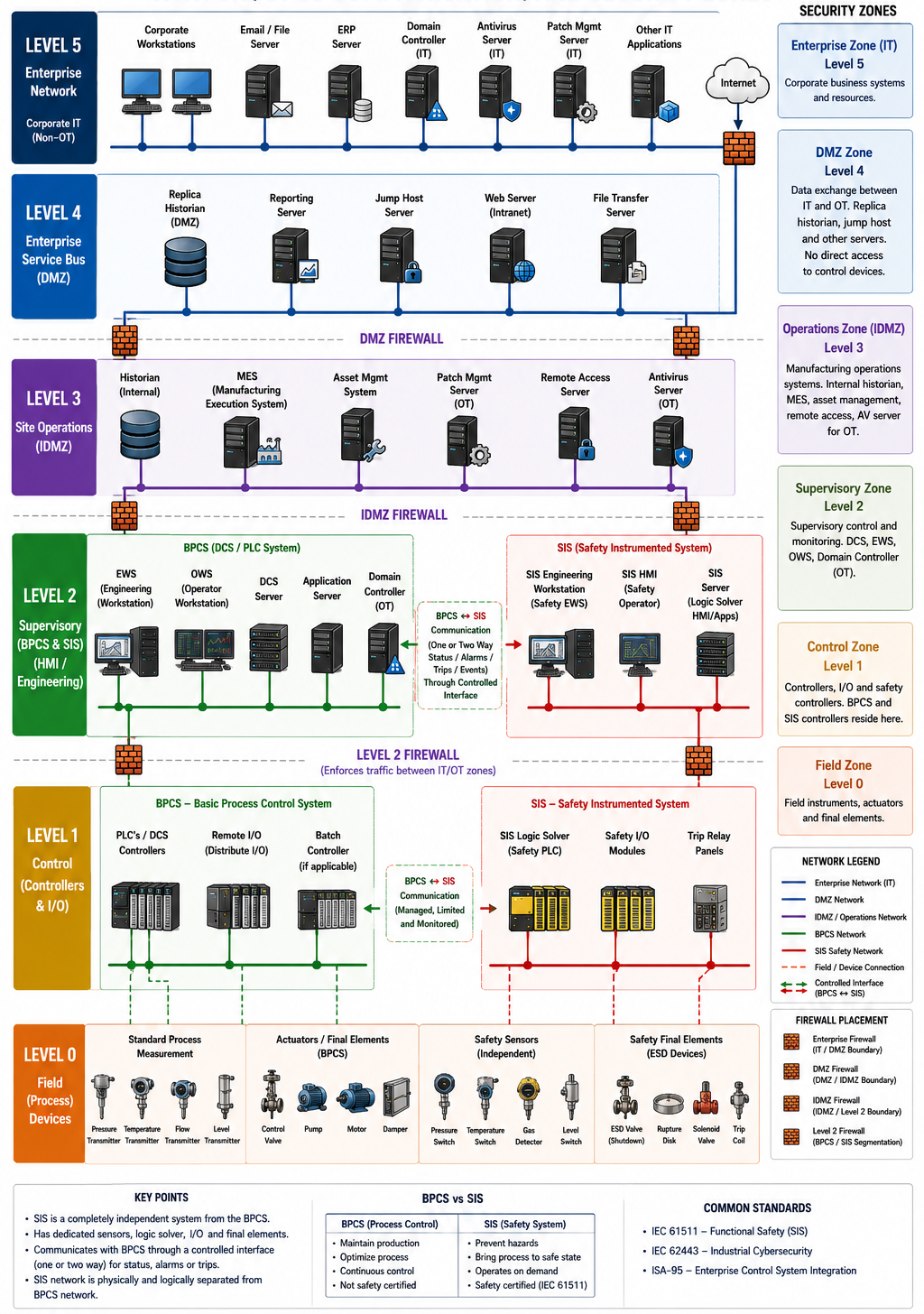
Second, SANS asks us to focus on a defensible architecture, one that can actually be defended. Start by locking down the environment. Below how we design the OT architecture in real world with SIS isolated from the primary control network, with tightly controlled communications between the BPCS and the SIS.
Device-Level Security
- SECURE SIS - In industrial automation, there is a common saying: the DCS keeps the plant running, but the SIS makes sure everyone goes home safely. That simple statement perfectly captures the difference between process control and functional safety. A Safety Instrumented System (SIS) is one of the most critical systems in any industrial facility. While the DCS or PLC is designed to operate the plant efficiently, the SIS has one purpose only to protect people, equipment, and the environment when something goes seriously wrong. The DCS focuses on keeping the process running, whereas the SIS focuses on preventing hazardous events or reducing their consequences.
Think of the SIS as the plant's independent emergency protection system. Under normal operating conditions, it does very little. It simply continuously monitors critical process parameters such as pressure, temperature, level, flow, or gas detection, waiting for conditions that indicate a dangerous situation. If the primary control system fails to respond, or the process exceeds predefined safety limits, it is the SIS that immediately takes the control and places the plant into a predefined safe state.
Unlike a standard PLC or DCS, an SIS is built on dedicated, safety-certified hardware and software that complies with international functional safety standards such as IEC 61508 and the process industry standard IEC 61511. SIS has its own independent sensors, safety logic solver, and final control elements, including emergency shutdown valves, trip relays, and circuit breakers. This independence is intentional. Even if the DCS suffers a hardware failure, software bug, operator mistake, or cyberattack, the SIS must still detect the hazardous condition and perform the required safety action.
The SIS also has its own dedicated safety network connecting the Safety PLC (logic solver), remote I/O, Engineering Workstation (EWS), and Safety HMI. This network is logically and often physically, separated from the Basic Process Control System (BPCS). Depending on the vendor, communication may use technologies such as PROFIsafe, CIP Safety, Safety over EtherCAT, or other proprietary safety protocols. These protocols are specifically designed to detect communication failures, corrupted messages, delays, duplication, and other faults to ensure that safety functions are always executed reliably. Although the DCS and SIS may exchange limited information, such as alarms, status, or diagnostics, the DCS should never be able to modify or override the SIS safety logic.
Let’s consider a boiler as an example: During normal operation, the DCS controls the boiler pressure. If pressure continues to rise because of a controller failure, valve malfunction, or software error, the DCS may no longer be able to maintain safe operation. The SIS monitors that same pressure using its own independent instrumentation. Once the pressure reaches a predefined safety limit, the SIS automatically executes an Emergency Shutdown (ESD), such as closing fuel valves, opening relief systems, stopping pumps, or tripping the process, preventing an explosion or catastrophic equipment failure.
From an OT security perspective, the SIS deserves the highest level of protection because it safeguards human life. It is normally isolated from the primary control network, with tightly controlled communications between the BPCS and the SIS. Any connectivity is carefully engineered, monitored, and restricted to ensure that a hardware failure, malware infection, or cyberattack affecting the production control system cannot disable or manipulate the safety functions. The principle is simple: even if everything else fails, the SIS must still work exactly as designed. - SECURE EWS (Engineering Workstation ):
An Engineering Workstation (EWS) is one of the most critical assets in any Distributed Control System (DCS) or Industrial Control System (ICS). If the Operator Workstation (OWS) is where operators monitor alarms, trends, and keep the plant running, the EWS is where the system is designed, configured, maintained, and changed. Simply put, operators run the process, while engineers build and modify it. For someone from an IT background, think of the EWS as the Domain Controller, Visual Studio, Git repository, and deployment server combined into a single privileged workstation. It contains the master engineering database for the control system and provides the tools to develop, modify, compile, and deploy control logic. From this workstation, control engineers create and edit PLC/DCS programs using standards such as IEC 61131-3, configure HMI graphics, assign I/O, set field device parameters, and manage the overall control system configuration. Any change made on the EWS, whether it is modifying a PID control loop, changing an interlock, updating an HMI screen, or adding a new field device, is compiled and downloaded to the target controllers over the plant control network. Because the EWS has the authority to change how the physical process operates, it is considered one of the highest-privileged systems in the OT environment. If compromised, an attacker can potentially modify the process itself, making the EWS one of the highest-value targets in an industrial network.
Unlike a normal corporate workstation, an EWS is rarely upgraded on a regular IT lifecycle. Engineering software such as Siemens TIA Portal, Rockwell Studio 5000, Schneider EcoStruxure, Emerson DeltaV, Honeywell Experion, ABB 800xA, and Yokogawa CENTUM is are notoriously expensive and heavily licensed, and often certified only for specific operating system versions. Many applications also depend on legacy Java versions, proprietary drivers, serial communication interfaces, or specialized hardware. As a result, it is still common to find Engineering Workstations running Windows XP, Windows 7, or other legacy operating systems even in 2026. This also means modern security controls, such as Endpoint Detection and Response (EDR) or Extended Detection and Response (XDR), are often unsupported or cannot be deployed without risking vendor support or system stability. Engineering Workstations become even more critical during scheduled shutdown, turnarounds, emergency maintenance, or equipment failures, where every minute of downtime directly impacts production and revenue.
Engineers use the EWS to troubleshoot controllers, modify control logic, download firmware, adjust setpoints, restore backups, and collect diagnostic information. During Factory Acceptance Testing (FAT) and Site Acceptance Testing (SAT), the EWS is also used extensively to validate system functionality before commissioning and handover. When a dedicated plant EWS is unavailable, vendors often connect using their own engineering laptops. From a security perspective, this introduces significant risk. That same laptop may have recently connected to a corporate network, hotel Wi-Fi, airport internet, or another customer site. Without proper controls, it can unintentionally introduce ransomware, malware, or even OT-specific threats into an environment where many critical systems still cannot run modern endpoint protection.
Another common but often overlooked risk is dual network connectivity. A vendor laptop connected to the OT network may still have its Wi-Fi adapter or cellular hotspot enabled. This can unintentionally create a bridge between the plant control network and the internet, bypassing firewalls, network segmentation, and other security controls. From an OT security perspective, this is considered a serious violation because it creates an unmanaged communication path into the control environment. The preferred approach is for the plant to provide dedicated, hardened Engineering Workstations that remain permanently inside the OT environment which never leave the site, with all required vendor software, licenses, and security controls already installed. When that is not practical, vendors may need to use their own engineering laptops, but only under strict security controls, including malware scanning, access approval, network isolation, session monitoring, and compliance with the site's OT cybersecurity policies. This significantly reduces the risk while still allowing engineers to perform the work required to keep the plant operating safely and reliably. - Shut down unused ports on switches and enable port security.
- Deploy a Network Access Control (NAC) solution that blocks unauthorized or rogue devices. Use NAC that handles AAA (Authentication, Authorization, and Accounting), ideally with TACACS+ support for device control, so only authorized users can run approved commands on network devices.
- Change all default passwords and set strong ones for every device. Avoid easy-to-guess passwords like “Admin123.”
- Keep Industrial Automation Control System (IACS) devices in read-only mode. Switch to Read/Write only when needed, then switch back to Read-Only.
- Use a Domain Controller (Active Directory) and join endpoints such as Engineering Workstations (EWS) and Operator Workstations (OWS) to the domain.
- Apply least privilege to both Engineering Workstations (EWS) and Operator Workstations (OWS).
- Choose a good anti-virus that can analyze user and file behavior and take action against abnormal activity.
- Block unused external media and USB ports. Cut off unnecessary access points.
- Create an application whitelist — only whitelisted applications can run on EWS and OWS; everything else is blocked by default.
Network-Level Security
- Deploy a strong firewall as our perimeter defense. Use two firewalls in High Availability for redundancy, Active-Passive or Active-Active, deploy as per standard design.
- Eliminate any single points of failure, the OT network itself should be redundant.
- Segment the network inside OT. Use the Purdue Enterprise Reference Architecture (PERA) as our design model. Segmentation is critical because it gives us granular control over OT, create multiple zones with different VLAN IDs assigned to different subnets, and allow communication between zones only where necessary, segmentation also makes its easy to isolate zone logically when needed, specially in IR.
- IT and OT networks should each connect only to the DMZ (Level 3.5) — never directly to one another.
- IT or any external network should reach the OT DMZ only from a fixed IP. Allow inbound connections to the DMZ only from specific static public IPs or IP ranges, through an IPSec tunnel, MPLS, VSAT, microwave, or fiber. The firewall should block every connection request from a source not explicitly defined in policy.
- Any system that needs direct internet access or access to an external network from OT — antivirus server, patch server, jump host, PAM, historian — belongs in the DMZ.
- If IT or an external network needs access to a historian or other database, place a replica of it in the DMZ. Never allow direct external connections into OT devices, or from OT devices out.
Document Everything
- Avoid giving full admin privilege to a single person. Split privileges among multiple people, and document how they're split — Segregation of Duties (SoD) matters.
- Maintain policies, procedures, and guidelines for every process to raise our security maturity. For example: an Employee Leaving Policy that requires all access to be revoked before an employee's last working day, with a checklist assigned to someone — security or HR — who must confirm completion. If it isn't followed, the responsible person should be held accountable. Security auditors should review compliance half-yearly or yearly and report violations to management.
- Likewise, maintain password policies and access policies for EWS/OWS, and documented guidelines for every process, operation, and activity — not limited to just these examples.
- Train users on every policy that applies to them, and verify understanding with a knowledge check.
Please note - Security is not a one-time setup. It's a continuous process. We need skilled people to identify gaps and fix them over time. Buying expensive technology doesn't guarantee security if it isn't configured correctly. In many cases, a simple, well-configured tool performs just as well as an expensive one.
03 Visibility & Monitoring
Someone rightly said , “We can't protect or defend something we don't see”
Visibility and monitoring are critical. We can't protect something we're not even aware of — a single blind spot can be dangerous. Keep an up-to-date asset inventory, map vulnerabilities to fix plans, and watch network traffic for trouble. Automate repetitive tasks wherever possible.
Monitoring checks whether our architecture actually holds up, spots threats early enough for automated response in large networks, and highlights weak spots. Standard IT tools don't understand industrial protocols like Modbus, DNP3, IEC 104, or PROFINET, so this is where OT-specific platforms come in — for example Nozomi Networks, Claroty, or Dragos, Inc. They're built for exactly this: they scan industrial networks in passive mode — mirroring a switch port and listening to packets without disturbing communication — build a behavioral baseline, flag anomalies, and turn that into actionable insight.
A Note on Dragos
Dragos offers advanced services and sharp threat intelligence, including Neighborhood Keeper, a free, opt-in collective-defense service that shares threat intelligence at machine speed across industries and regions. By participating, each organization's defensive capability becomes stronger than what it could achieve alone.
Dragos also offers premium services, including:
- WorldView — Dragos's threat intelligence product, used in SOCs, boardrooms, and the physical facilities of electric grids, oil and gas pipelines, water treatment plants, and manufacturing sites. It delivers insights tailored to OT and ICS environments, helping practitioners stay ahead of emerging adversary activity.
- OT Watch — A managed service where Dragos's own analysts and threat hunters operate the Dragos Platform on our behalf: enhancing visibility, identifying threats, and tuning our posture continuously, without adding to our team's workload.
Dragos offers other professional services specific to ICS/OT environments as well, a strong choice if we want a guided, step-by-step path to a safer facility. I recommend Dragos because it was built by OT cybersecurity practitioners, for practitioners, they know the pain points firsthand, and their visibility and monitoring capability reflects that. (This is my personal opinion — I am not sponsored by anyone to say this.)
04 Secure Remote Access
This is huge in OT, where people frequently connect from outside the plant, especially during firmware updates, patching, or vendor-involved work. Make sure every remote connection goes through a VPN and a Privileged Access Management (PAM) solution.
An OT PAM solution provides a secure, brokered "session" where the remote vendor never gets direct routing access to the plant floor. It records full video of the technician's screen, requires multi-factor authentication, and enforces time-bound access(JIT) and Just Enough Access (JEA) so external connections can be terminated instantly by plant operators if something goes wrong, it does all the configuration through a Jump Host / Remote Access Server on PAM Recorded Session.
Remote Access Server is like an IT bastion host, a Jump Host sits in the Industrial Demilitarized Zone (IDMZ), the border layer between IT (Purdue Level 3.5) and OT (Purdue Level 3). Any engineer or contractor who wants to program a PLC must access into this hardened Jump Host. It prevents direct network routing between corporate IT laptops and the critical control machinery down on the plant floor.
A simple win here is multi-factor authentication, a classic IT trick that works just as well in OT, with very little added friction. Roll it out across systems for an extra layer of protection. If MFA isn't feasible on a given system, use closely monitored jump hosts instead.
The key idea - Watch the connections going into and out of the OT network — not the traffic inside it.
05 Risk-Based Vulnerability Management
Risk in OT is not determined by a CVSS score alone. It's driven by our operational context, business priorities, and, most importantly, our crown jewels. It's common to find legacy operating systems like Windows XP or Windows 7 still running in industrial environments because critical applications or OEM software depend on them. Yes, they have known vulnerabilities, but that doesn't automatically make them our highest risk. Before making any security decision, conduct a thorough Crown Jewel Analysis, maintain an accurate asset inventory, and understand which systems are truly critical to our operations. Above all else, remember that human life and safety always come first.
Patching in OT isn't like updating our laptop or smartphone. Every patch carries operational risk, and shutting down a plant or production line can cost millions of dollars. It's always a balancing act between cybersecurity risk and operational continuity.
Stay on top of newly disclosed vulnerabilities, but prioritize them based on actual risk to our environment rather than severity scores alone. Where immediate patching isn't practical, implement appropriate compensating controls such as network segmentation, access restrictions, enhanced monitoring, or application whitelisting to reduce the attack surface while operations continue safely. Always validate vendor patches in a representative test environment before deploying them into production. If a patch cannot be applied immediately, plan its deployment during the next approved maintenance window based on operational priorities and the level of risk it addresses.
06 Physical Security
I'm not sure why this gets overlooked so often, but it's the control that ties everything else together. BYOD doesn't work inside an OT network the way it does in IT. Let me explain…
The vendor owns the proprietary engineering software required to configure, calibrate, or program specific industrial assets, PLCs, RTUs, HMIs, or smart instrumentation.
These software suites, Siemens TIA Portal, Rockwell Studio 5000, Schneider EcoStruxure, and similar, are notoriously expensive and heavily licensed. Vendors typically keep these licenses tied to their own corporate engineering laptops, and the software often requires very specific OS versions, legacy Java runtimes, or custom drivers to talk to physical serial ports or specialized NICs.
When a critical asset fails, or during a scheduled shutdown or turnaround, every minute counts — production is halted and time is money. Vendors often plug their laptops directly into the asset to modify ladder logic, push firmware updates, adjust setpoints, or pull raw diagnostic logs directly from a controller when central visibility isn't enough. During Factory Acceptance Testing (FAT) and Site Acceptance Testing (SAT), vendor laptops are used the same way, to validate systems before handover.
Now What’s The Risk Is Involved?
When that laptop bridges into our OT environment, it effectively bypasses our perimeter defenses and introduces real risk.
The vendor engineer may have travelled from another site, stayed in a hotel, and connected that same laptop to hotel Wi-Fi, an airport network, or their own corporate network just hours earlier. That laptop can unintentionally carry IT ransomware, or even OT-specific malware, straight into an environment where many systems still lack modern Endpoint Detection and Response (EDR) coverage.
Another common risk: vendors leave a Wi-Fi adapter or cellular hotspot active while simultaneously connected to the OT Ethernet network. This can accidentally create an unmonitored bridge between the internet and the plant's critical process control network, quietly bypassing every control we've put in place.
How to Mitigate This Risk
In a perfect world, vendors wouldn't need to bring physical machines at all. In the real world, many plants still lack the infrastructure to support secure alternatives. Ideally, the plant provides dedicated, hardened, on-site Engineering Workstations with all required vendor software pre-installed, if the plant can't provide one, the vendor brings their own along with the risk mentioned above. Similarly, if the plant lacks a secure, MFA-protected jump host or a properly designed Industrial DMZ (IDMZ) for remote engineering access, physical presence becomes the only practical option.
Since vendor work can't be eliminated entirely, strong compensating controls are what reduce the risk:
- Isolated Vendor VLANs - If a vendor must connect to the network, place them in a highly restricted, temporary VLAN that only permits communication with the specific IP addresses of the assets they're servicing — not the entire plant network.
- Dedicated On-Site Engineering Assets - Move toward a model where vendors use plant-owned, hardened engineering laptops that never leave the plant site, or provide access through a tightly monitored Virtual Desktop Infrastructure (VDI) hosted inside the IDMZ.
- Verify Firmware - A plant automation engineer should over-the-shoulder monitor the entire session. If firmware is being pushed, insist that the binary hash (SHA-256) is verified against the official OEM release notes before it's loaded.
- Physical Port Security - Disable unused switch ports, lock network cabinets, and physically secure engineering access points to prevent unauthorized connections.
Physical access control for people matters just as much — we have to control who gets in and out of the facility, and make sure nothing sneaks out either.
Without Physical Security:
we risk a Stuxnet-style attack. Cyber defenses are useless if someone can tamper with equipment inside our facility.
In OT, physical security is non-negotiable — think locks, badges, device checks, and policies to stop insider or external breaches.
07 - SUPPLY CHAIN RISK MANAGEMENT (SCRM)
No matter how secure our home is, it's very important to know who is getting into it. One vulnerable third party can become the entry point to our next breach.
The same principle applies to Operational Technology environments.
Today, organizations outsource a significant share of their critical operations to external vendors, system integrators, OEMs, managed security providers, cloud service providers, and maintenance contractors. These partnerships bring specialized expertise and operational efficiency, but they also introduce one of the largest attack surfaces in any critical infrastructure environment.
In OT, our security posture is no longer defined only by our own controls, it's also determined by the security of every third party that connects to our industrial environment. A compromised vendor can quickly become the entry point into our plant.
Common OT Services Frequently Outsourced
- OEM & System Integrator Support — Vendors maintain proprietary engineering software, licenses, PLC/DCS programming, and specialized automation expertise through Long-Term Service Agreements (LTSAs).
- Predictive Maintenance & Industrial Analytics — Plant telemetry is sent to cloud platforms where AI and machine learning models predict equipment failures before they occur.
- Managed OT Security (MSSP / MDR / ISOC) — Continuous monitoring of industrial networks using platforms such as Nozomi, Dragos, or Claroty is often outsourced, since running a 24/7 in-house OT SOC requires highly specialized expertise.
- Plant Turnarounds & Commissioning — During shutdowns and major upgrades, organizations rely on external engineering teams for equipment replacement, commissioning, calibration, and large-scale maintenance.
- Industrial Network & Telecom Management — Management of industrial firewalls, routing, switching, wireless infrastructure, and IDMZ environments is frequently handled by specialized network service providers.
The Core Risks of OT Outsourcing
Unlike IT, where an outsourcing incident might mean data loss or application downtime, failures in OT can mean equipment damage, environmental impact, production outages, or even loss of life. Here are six of the most common risks:
- Persistent Remote Access - Vendors often need remote connectivity for diagnostics and maintenance. SANS does talk about Secure Remote Access, but it does not tell us that the real risk is usually not the vendor itself but the compromise of the vendor's own corporate environment. If an attacker steals a vendor engineer's credentials, they may inherit that same trusted access into our industrial network. If remote sessions terminate directly into the Control Network instead of an Industrial DMZ, attackers can gain direct access to critical systems.
- Compromised Engineering Workstations - Vendor engineers typically use portable engineering laptops. If these devices connect to the plant network while remaining connected to Wi-Fi, VPN, or cellular, they unintentionally bridge secure OT environments with external networks, bypassing the segmentation we built.
- Software & Firmware Supply Chain Attacks - Every firmware upgrade, PLC logic change, or software update carries an element of trust. If a vendor's software repository or development environment is compromised as demonstrated by SolarWinds or NotPetya — malicious code can be introduced directly into industrial control systems.
- Cloud Telemetry & Intellectual Property Exposure - Predictive maintenance platforms collect enormous amounts of operational data: process values, production trends, equipment performance, operational behavior. Even when configured as one-way traffic, if that data is compromised, attackers gain insight into proprietary manufacturing processes and critical production assets — more than enough for a reconnaissance phase
- Loss of Internal Knowledge - Excessive dependence on external vendors gradually erodes internal engineering expertise. When experienced contractors leave or are unavailable during an emergency, the organization becomes dependent on vendor availability, directly affecting recovery time and operational resilience
- Fourth-Party Risk - Many organizations carefully assess their direct vendors but overlook who those vendors rely on. Without proper governance, subcontractors can gain access to sensitive systems without ever being evaluated by the asset owner, an unmanaged, additional layer of supply chain risk.
How to Mitigate These Risks
The following checklist helps reduce both cyber and operational risk associated with third-party access to industrial environments.
1. Secure Remote Access
Mitigates: Persistent Remote Access Risk
|
✓ |
Route all vendor remote
connections through an Industrial DMZ (IDMZ) using dedicated jump servers. |
|
✓ |
Never allow
direct VPN connectivity into Level 2 or Level
3 industrial networks. |
|
✓ |
Implement Just-In-Time (JIT)
remote access with automatic expiration. |
|
✓ |
Require Multi-Factor Authentication (MFA) for every
remote session. |
|
✓ |
Record and monitor all
privileged vendor activity using a Privileged Access
Management (PAM) solution. |
2. Secure Engineering Devices
Mitigates: Compromised Engineering Workstations
|
✓ |
Require vendor laptops
to be managed through corporate MDM or equivalent endpoint management. |
|
✓ |
Prevent simultaneous Ethernet, Wi-Fi, VPN,
Bluetooth, or cellular connectivity (dual-homing). |
|
✓ |
Scan all laptops
and removable media
through a dedicated “Sheep Dip”
station before connecting to plant assets. |
|
✓ |
Protect switch
ports using 802.1X, Sticky
MAC, or equivalent network access controls. |
3. Protect Industrial Data
Mitigates: Cloud Telemetry & Data Exposure
|
✓ |
Share only
the minimum operational data required. |
|
✓ |
Remove or anonymize sensitive production information whenever possible. |
|
✓ |
Encrypt all telemetry using
TLS 1.3 with Mutual TLS
(mTLS). |
|
✓ |
Verify that
vendors maintain recognized certifications such as ISO 27001
or SOC 2 Type II
— with evidence. |
4. Preserve Internal Capability
Mitigates: Vendor Dependency
|
✓ |
Require complete engineering documentation before
project closure. |
|
✓ |
Include formal
knowledge transfer and
hands-on training for plant personnel. |
|
✓ |
Define clear
Recovery Time Objectives (RTOs) and response SLAs within vendor
contracts. |
5. Control Fourth-Party Risk
Mitigates: Unauthorized Subcontracting
|
✓ |
Require written approval before any subcontractor is engaged. |
|
✓ |
Ensure all subcontractors meet
the same cybersecurity, compliance, and personnel screening requirements as the primary vendor. |
|
✓ |
Maintain an approved list
of authorized subcontractors. |
A note on trust - In security, there is unfortunately no place for “trust.” Technical controls are only effective when they are continuously verified.
Identity & Access Management
- Issue accounts only to named vendor personnel.
- Prohibit shared or generic vendor accounts.
- Apply least-privilege access and Just-In-Time provisioning.
Right to Audit
- Include contractual rights to audit vendor personnel, remote access logs, engineering changes, and system activity.
- Periodically verify that only approved personnel are accessing critical infrastructure.
- Review vendor compliance against contractual cybersecurity requirements.
Third-party vendors are an essential part of modern industrial operations, but every connection they establish extends our attack surface. Effective Third-Party Risk Management isn't about eliminating vendors
— it's about making sure every connection, every engineer, every device, and every software update is secure, verified, monitored, and controlled before it reaches our critical infrastructure.
References & Sources
This article was developed through an extensive review of academic journals, peer-reviewed research papers, technical reports, industry publications, and professional guidance covering operational technology (OT), industrial control systems (ICS), smart grids, and critical infrastructure protection.
Key reference material includes publications from SANS — The Five ICS Cybersecurity Critical Controls.
Disclaimer
This article is intended solely for educational and awareness purposes. It consolidates information from multiple publicly available academic and technical sources together with the author's professional experience in industrial cybersecurity and critical infrastructure protection. While every effort has been made to ensure technical accuracy, some concepts have been simplified to improve readability for a broader audience. Readers should consult OT cybersecurity professionals, vendor documentation, and authoritative guidance before making engineering, operational, or security decisions.
AI Assistance Disclosure
To improve readability, grammar, sentence structure, and overall clarity, AI writing tools were used as an editorial assistant. The technical concepts, interpretation, structure, and final technical review were performed by the author. AI was not used as a primary source of technical information or research.
If you found this article useful, share with others — give it a thumbs up if you are on a post, it motivates me to write more. If you have questions or want to share your thoughts, I'd love to hear from you.
Feel free to email me at sec[dot]asmz[at]gmail[dot]com.
About Author:
Abu Saleh Md. Zakaria B.S. Computer Science, University of Pune, India Security Researcher — Protecting Critical Infrastructure (Smart Grids, Water, Aviation, Telecom, Banking) SANS GIAC x4 · CCIE (Security) · PCNSE · SABSA · ISO 27001 LA/LI · ASIS PSP Google Scholar: 300+ Citations
Published on ICSCyberpro.net — a non-profit, vendor-neutral initiative to learn, secure, and collaborate
Download the PDF Version of this here:


If you found this article useful, share it, comment — it motivates me to write more. If you have questions or want to share your thoughts, I'd love to hear from you. Feel free to email me at sec[dot]asmz[at]gmail[dot]com.